Hello @rivad ,
I found that a previous post (Can you use an "icingacli" command as a service? - #19 by ottonaut) was close to same issue as mine : the difficult point is to use '/usr/bin/icingacli' 'vspheredb' 'check' 'vm' '--name' 'fqdn' as command of the check command object.
As I read some of your answers about this same issue to various people having the same question, and as I saw you managed to make it work, I’m very confident you and I will manage to make it clear and figure out what I did not understand. So, please see no offence if I’m detailing very precisely what I’m doing : my hope is for both of us to save some times.
Like a kid, I will also add numbered bullet points to help you rapidly point where my flaws are.
- In Director, I create a brand new command, NOT using any command template, which I design this way :
- I click on “Store” then I click on “Preview”, and there, I see that Icinga has escaped the single quotes. Indeed, if I try to deploy this command on a test host, the inspect feature is showing that the command will be this terrible string :
'/usr/lib/nagios/plugins/'\''/usr/bin/icingacli'\''' ''\''vspheredb'\''' ''\''check'\''' ''\''vm'\''' ''\''--name'\''' ''\''fqdn'\''' - I then remove the single quotes in the command, deploy it and now, the inspect is showing a better [1] string :
'/usr/bin/icingacli' 'vspheredb' 'check' 'vm' '--name' 'fqdn' - This check command is still failing because, obviously, nothing nor noone gave icinga the fqdn it is requiring.
- I guess it is here that I may be missing a way to define a field, a variable or something to feed this command with the adequate value? These are points I didn’t get in the docs.
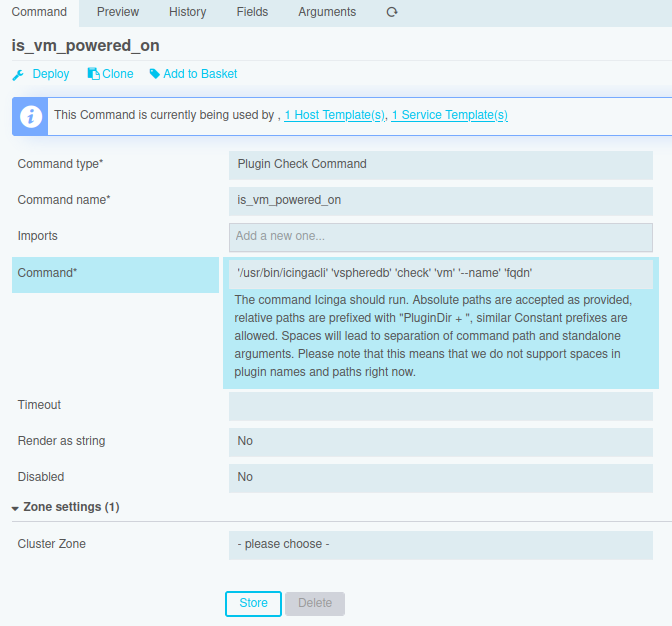
[1] I have just discovered that if the command has a leading slash, the actual check command path won’t be prefixed with /usr/lib/nagios/plugins/ explaining tons of time I wasted trying just to figure this out.