Hey everyone,
I’m looking for some documentation/help/guidance on how to access the vSphereDB API externally. Needing to run some reports, and all the data I’m wanting to get is already being pulled by the module.
I’ve read the available docs, which mentions to use vspheredb/vms/export, but I’m struggling to use this in the URI.
I’m hoping this is a quick and easy one for someone more knowledgeable than me!
Thanks
rivad
November 25, 2025, 1:19pm
2
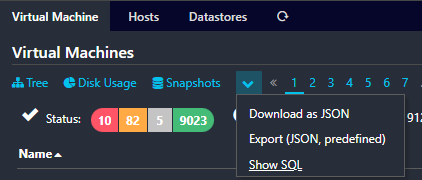
SQL or JSON ist the API I would use for the reports.
You can find the URIs here:
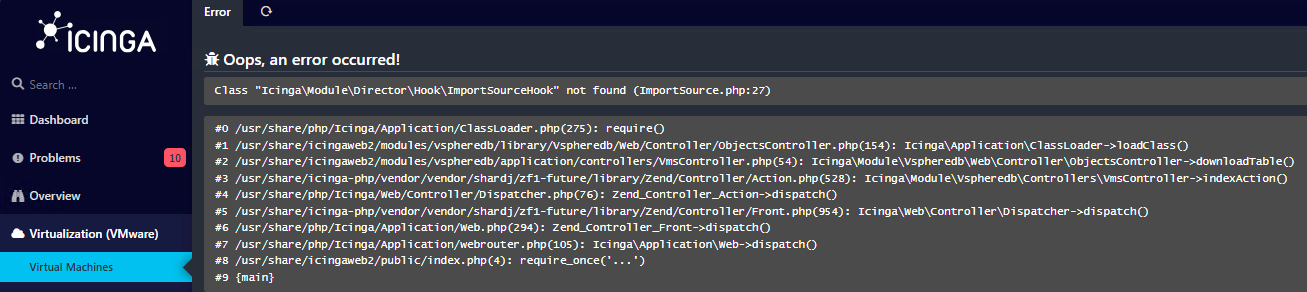
No issues with the SQL query, but neither of the JSON options work for me, and throw up this error:
This is part of the reason why I’m looking at accessing the API externally, as I haven’t been able to resolve this error.
bberg
November 26, 2025, 8:19am
4
The Error message hints to me that you need to have the Icinga Director installed.
rivad
November 26, 2025, 2:16pm
5
Yes, looks like there’s a dependency to the director.
Thanks guys, enabling director allows JSON to be downloaded successfully.
No configuration is required in director to enable downloads.
1 Like
Still doesn’t answer the question of how to access the API externally, but this gets me some of the way there.
bberg
November 27, 2025, 8:47am
8
I mean, there is check_vsphere_data, but its also just using an SQL Connection to the database of vSphereDB. GitHub - NETWAYS/check_vspheredb_data: A check plugin to monitor various data collected by the Icingaweb2 vSphereDB module by querying its database.
Im sorry, but i dont have any experience on accesing the API externally
rivad
November 27, 2025, 9:59am
9
IMHO still SQL is the external API.