Hi all
What I have installed:
icinga2 (version: r2.15.1-1)
Ubuntu 24.04
icinga2 director 1.11.5-1+ubuntu24.04
icinga2 feature list : api checker icingadb mainlog notification
root@monitoramento:~# icinga2 daemon -C
[2025-10-22 10:33:53 -0300] information/cli: Icinga application loader (version: r2.15.1-1)
[2025-10-22 10:33:53 -0300] information/cli: Loading configuration file(s).
[2025-10-22 10:33:53 -0300] information/ConfigItem: Committing config item(s).
[2025-10-22 10:33:53 -0300] information/ApiListener: My API identity: monitoramento.contato.com.br
[2025-10-22 10:33:53 -0300] information/ConfigItem: Instantiated 12 Notifications.
[2025-10-22 10:33:53 -0300] information/ConfigItem: Instantiated 2 NotificationCommands.
[2025-10-22 10:33:53 -0300] information/ConfigItem: Instantiated 1 IcingaApplication.
[2025-10-22 10:33:53 -0300] information/ConfigItem: Instantiated 10 HostGroups.
[2025-10-22 10:33:53 -0300] information/ConfigItem: Instantiated 17 Hosts.
[2025-10-22 10:33:53 -0300] information/ConfigItem: Instantiated 1 Downtime.
[2025-10-22 10:33:53 -0300] information/ConfigItem: Instantiated 1 Comment.
[2025-10-22 10:33:53 -0300] information/ConfigItem: Instantiated 1 IcingaDB.
[2025-10-22 10:33:53 -0300] information/ConfigItem: Instantiated 1 FileLogger.
[2025-10-22 10:33:53 -0300] information/ConfigItem: Instantiated 19 Zones.
[2025-10-22 10:33:53 -0300] information/ConfigItem: Instantiated 1 CheckerComponent.
[2025-10-22 10:33:53 -0300] information/ConfigItem: Instantiated 17 Endpoints.
[2025-10-22 10:33:53 -0300] information/ConfigItem: Instantiated 1 ApiUser.
[2025-10-22 10:33:53 -0300] information/ConfigItem: Instantiated 1 ApiListener.
[2025-10-22 10:33:53 -0300] information/ConfigItem: Instantiated 1 NotificationComponent.
[2025-10-22 10:33:53 -0300] information/ConfigItem: Instantiated 264 CheckCommands.
[2025-10-22 10:33:53 -0300] information/ConfigItem: Instantiated 1 User.
[2025-10-22 10:33:53 -0300] information/ConfigItem: Instantiated 1 UserGroup.
[2025-10-22 10:33:53 -0300] information/ConfigItem: Instantiated 3 ServiceGroups.
[2025-10-22 10:33:53 -0300] information/ConfigItem: Instantiated 3 TimePeriods.
[2025-10-22 10:33:53 -0300] information/ConfigItem: Instantiated 234 Services.
[2025-10-22 10:33:53 -0300] information/ConfigItem: Instantiated 1 ScheduledDowntime.
[2025-10-22 10:33:53 -0300] information/ScriptGlobal: Dumping variables to file ‘/var/cache/icinga2/icinga2.vars’
[2025-10-22 10:33:53 -0300] information/cli: Finished validating the configuration file(s).
What am I trying to solve after struggling for days and reading roles page:
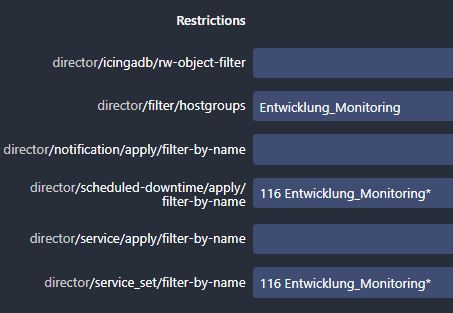
I have a user xxx; For this user I create a domain xxx whith several machines. As administrator I see all and everithing is running perfectly.
I would likke to allow user xxx at login and enable him see only Dashboard, Problems and Overview that belongs to domain xxx or hostgroup = xxx
Is there any tutorial about it?
An example would it be as:
http://192.168.20.4/icingaweb2/icingadb/hostgroup?name=xxx
http://192.168.20.4/icingaweb2/icingadb/services?((service.name=check_temperature
Thanks in advanced