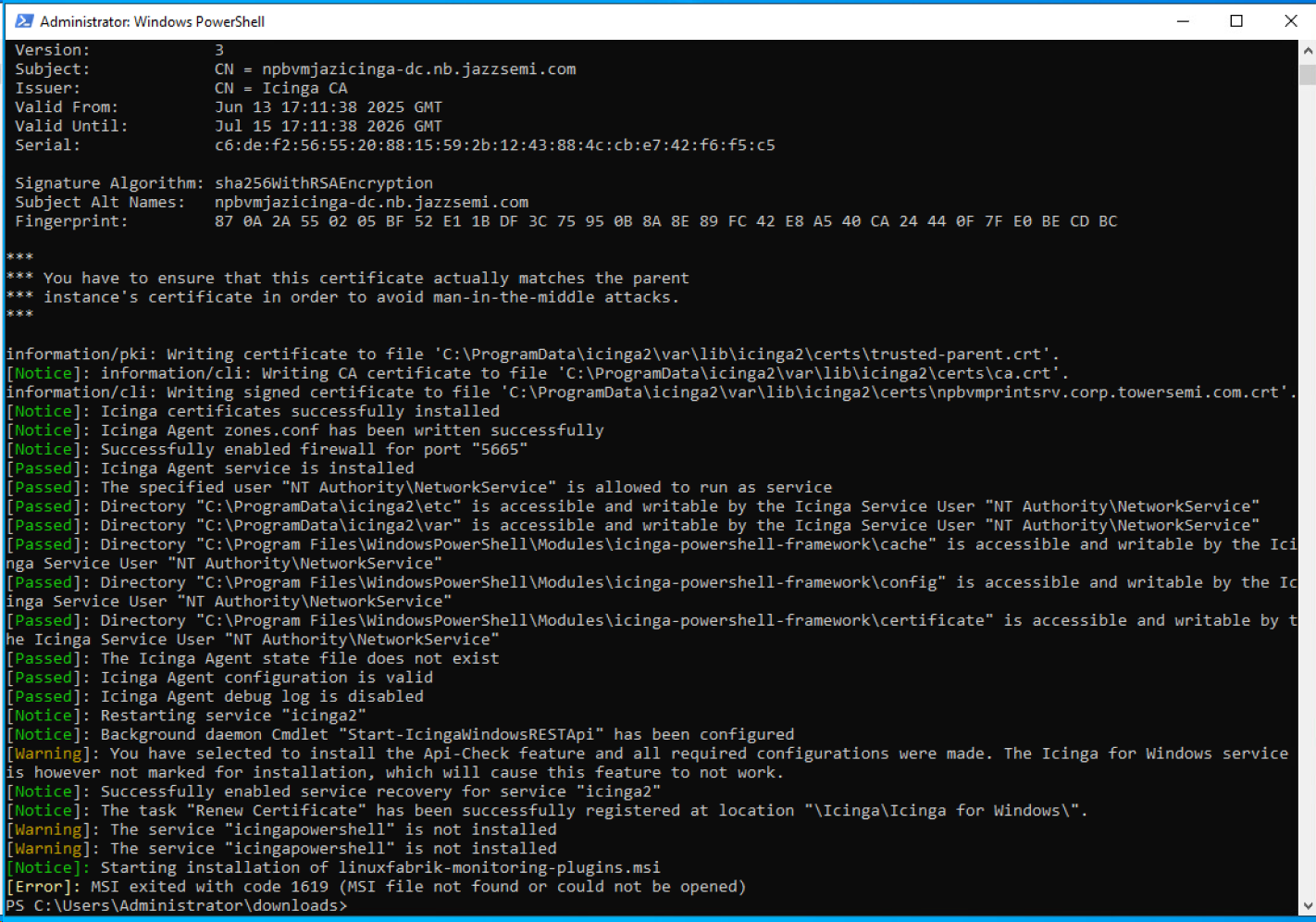
I have a new VM running Ubuntu 24.04, Icinga 2 clean install okay with director. Install of linuxfabrik ok without errors.
Had a couple of issues with setting up the hosts, but that seems to be mostly resolved now, they’re in the system and talking to the server. And I have 3 services already setup which are automatically trying to run on each server, a simple ping, uptimerobot & disk usage. They’re all running but they’re getting a “file not found” error for each one.
Command /usr/lib64/nagios/plugins/uptimerobot --timeout 30 --url https://status.linuxfabrik.io failed to execute: 2, “The system cannot find the file specified.”<Terminated with exit code 127 (0x7F).>
Command /usr/lib64/nagios/plugins/ping --count 5 --hostname 127.0.0.1 --interval 0.200000 --timeout 5 failed to execute: 2, “The system cannot find the file specified.”<Terminated with exit code 127 (0x7F).>
Command C:\Program Files\icinga2\sbin\linuxfabrik\disk-usage.exe --critical 95%USED --warning 90%USED failed to execute: 2, “The system cannot find the file specified.”<Terminated with exit code 127 (0x7F).>
Is this because the host install on each failed at the end with an error regarding the linuxfabrik-monitoring-plugins.msi file not found or could not be opened ???
So it looks like most of the issues have been cleared. I’ve got 4 plugins working on 2 of the 3 host servers but I’m having issues with the original host. This is the one where I tried installing the agent normally first. I uninstalled that agent and I’ve run the script @rivad gave me twice, which ran successfully, no errors. But I’m still getting “jaz-fsvm is not connected to npbvmjazicinga” errors on each of the 4 checks.
How do I troubleshoot this on one host? Is there a script or program that will wipe/clear the host server of all things Icinga, so I can try it from scratch? The other 2 servers that were run with just the script are working fine. I’m about to add a few more hosts to see if it keeps working, but I need that original host working, it’s one of the most important I need to monitor.
I’ve tried that, twice. The script runs without errors, but it still says “not connected” on the icinga server side. I even restarted the icinga server itself. No change.
That seems to have done it… I’m getting a bunch of “overdue” messages, even though I’ve clicked on “check now” for each of the 4 checks, but it’s not giving me the “not connected” error anymore.
Thank you for the assistance. I literally couldn’t have done this without you!
Ok, this is weird… it looked like it was going to be fine, but now all 4 are back in the “service problems” category with the “not connected” error again.
I don’t get it. They’re both using FQDN, same as the other 2 hosts that are working fine. The only difference with this one is that it’s the one I was using at first and had setup the full Icinga Powershell stuff on with the Icinga 2 agent. I uninstalled the agent in Control Panel, I don’t know any way to clean out the other stuff. Your script runs without errors except two places where it tries to install a file that already exists. The host can ping the server, can access the site, it’s not that. And when I deleted the host from the server, then reran the script on the host, it re-added the host to the host list on the server, so CLEARLY it’s “connected”. I don’t know why the service checks are giving that error.
If you execute icinga2 -V you get all paths.
But I would enable the debug log first and try to figure out, what’s wrong with with the connection, the scheduling or what ever.