I am currently trying to get an OS check running on a windows agent using the check_wmi plugin of th nscp client and check_nscp_api. The executed command on the agent looks as follows:
'C:\Program Files\ICINGA2\/sbin/check_nscp_api' '--password' 'password' '-H' 'localhost' '-a' 'query=Select Version,Caption from win32_OperatingSystem' '-a' 'warn=Version not like '\''10.0'\''' '-a' 'crit=Version not like '\''10'\''' '-q' 'check_wmi'
and generates the following output when run locally via Powershell: check_wmi Microsoft Windows Server 2016 Standard, 10.0.14393 | 'Version'=10014393;10;10
As you can see, there are performance data embedded into the output string, but for some reason they don’t show up in Icingaweb2 for the corresponding services.
Is there a known way to troubleshoot missing performance data? When googling I only came across missing performance data in databases due to wrong configuration or malformed performance data in the output string, but this is not the case here.
Digging this up as I stumbled across this yesterday.
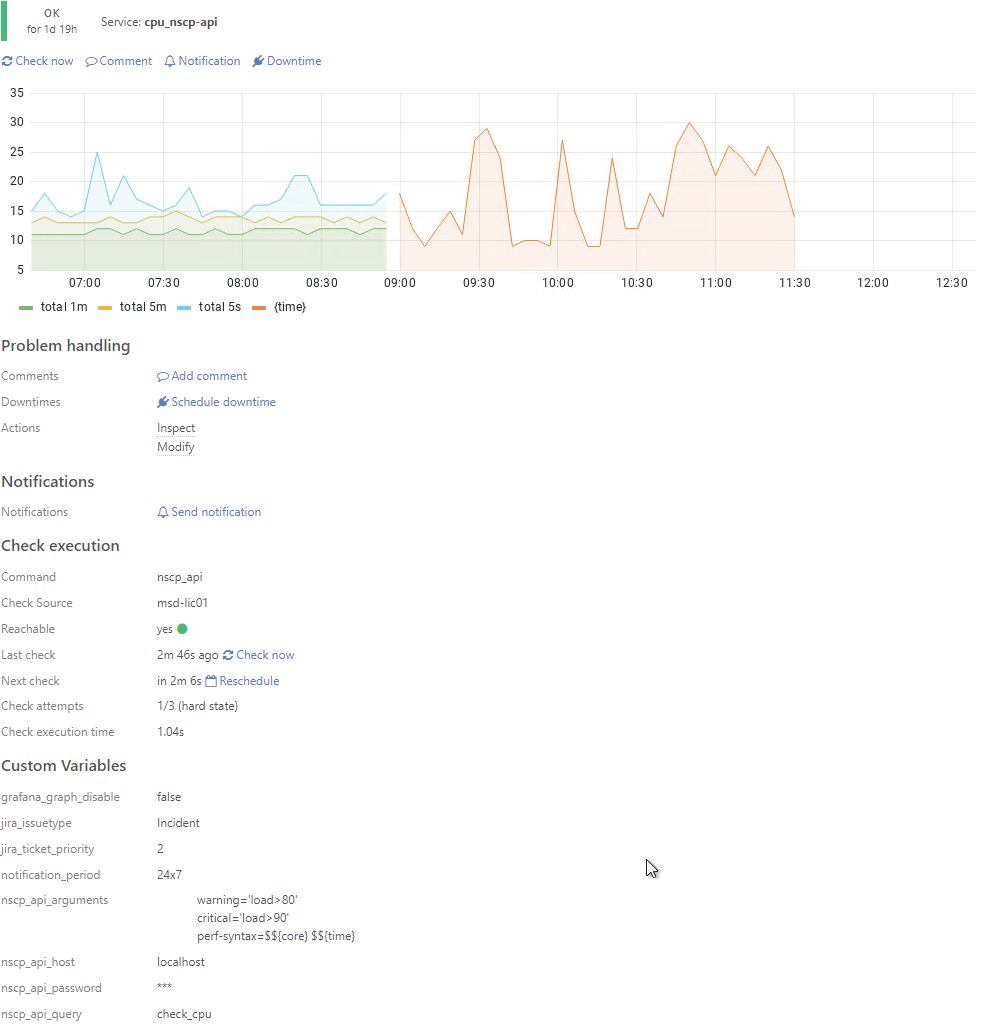
I was implementing a cpu check and didn’t get any perf data in Icinga Web 2 with the following check:
without any arguments, which then uses the commands default. This then has the perf data also shown in Icinga Web 2.
So I assume that check_nscp_api seems to somehow override the default completely when specififying args in the check command. I will test if adding a perf-syntax=${core} ${time} to the check command yields the same result and report back.
The graph shows the following:
left side with the three lines:
using just check_cpu in nscp_api_query. No values in nscp_api_arguments
middle, red line:
added perf-syntax=${core} ${time} to nscp_api_arguments. This resulted in the perdata to be displayed as ${time} as label for all values.
right side, no line:
added the correctly $-sign escaped string perf-syntax=$${core} $${time} to nscp_api_arguments, as well as the warningand critical arguments.
This results in no perfdata at all.
Last try:
only added the correctly $-sign escaped string perf-syntax=$${core} $${time} to nscp_api_arguments and removed the warn and crit stuff.
changed then args for warn and crit to warning= load > 80 and critical= load > 90 and that did the trick.
Seems like the single quotes ' surrounding the warning and critical filter where the problem.