I updated my Icinga2 environment today. Since then I have the problem that the IcingaDB no longer works.
Status:Icinga DB is outdated, please upgrade to version 1.4.0 or later.
However, the output on the icingadb command tells me that I am already on the current version. I have also installed the latest SQL schema update.
 systemctl status icingadb
× icingadb.service - Icinga DB
     Loaded: loaded (/lib/systemd/system/icingadb.service; enabled; preset: enabled)
     Active: failed (Result: exit-code) since Mon 2025-07-21 15:26:48 CEST; 3h 53min ago
   Duration: 5ms
    Process: 214553 ExecStart=/usr/sbin/icingadb --config /etc/icingadb/config.yml (code=exited, status=1/FAILURE)
   Main PID: 214553 (code=exited, status=1/FAILURE)
        CPU: 11ms
Jul 21 15:26:48 monitoring systemd[1]: Starting icingadb.service - Icinga DB...
Jul 21 15:26:48 monitoring icingadb[214553]: Starting Icinga DB daemon (v1.4.0)
Jul 21 15:26:48 monitoring systemd[1]: Started icingadb.service - Icinga DB.
Jul 21 15:26:48 monitoring icingadb[214553]: Connecting to database at 'mysql://icingadb@IPv4:3306/icingadb'
Jul 21 15:26:48 monitoring icingadb[214553]: unexpected database schema version: v6 (expected v7), please make sure you have applied all database migrations after upgrading Icinga DB
Jul 21 15:26:48 monitoring systemd[1]: icingadb.service: Main process exited, code=exited, status=1/FAILURE
Jul 21 15:26:48 monitoring systemd[1]: icingadb.service: Failed with result 'exit-code'.
2025-07-21T19:14:17.130+0200 INFO icingadb Starting Icinga DB daemon (v1.4.0)

2025-07-21T19:14:17.130+0200 INFO icingadb Connecting to database at 'mysql://icingadb@172.16.100.80:3306/icingadb'

2025-07-21T19:14:17.134+0200 FATAL icingadb unexpected database schema version: v6 (expected v7), please make sure you have applied all database migrations after upgrading Icinga DB
Do we have a known bug here or do any of you have an idea before I restore my snapshot
Icinga DB Web version (System - About): 1.2.2
Icinga Web 2 version (System - About): 2.12.5
Web browser: Microsoft Edge, Google Chrome
Icinga 2 version (icinga2 --version): r2.15.0-1
Icinga DB version (icingadb --version): v1.4.0
PHP version used (php --version): 8.2.29
Server operating system and version: Debian 12 (Bookworm)
I updated schema 1.4.0.sql using the command mysql -u icingadb -p icingadb <1.4.0.sql. As I see it, I have imported the expected schema after all. I ran the command again to be sure and I get the following message.
Enter password:
--------------
ALTER TABLE host ADD COLUMN total_children int unsigned DEFAULT NULL AFTER check_retry_interval
--------------

ERROR 1060 (42S21) at line 1: Duplicate column name 'total_children'
Why do you suspect that the scheme upgrade was not correctly performed?
Looking at your icingadb_schema table, you have first updated from MySQL schema version 5 to 7 (Icinga DB version 1.2.0 and 1.4.0, respectively) and have skipped schema version 6 (Icinga DB 1.2.1). Then, you have applied schema version 6 twice. However, there are some time gaps between updates:
schema version 5 on Fri Apr 19 11:52:04 AM UTC 2024
schema version 7 on Thu Apr 17 07:04:31 PM UTC 2025
schema version 6 on Tue Apr 22 06:54:49 AM UTC 2025
schema version 6 on Mon Jul 21 01:21:38 PM UTC 2025
Since the current Icinga DB check logic is quite simple, it selects the schema version with the greatest id, which would be 6 in your case. You can try to quick fix this by updating the version value of the column where id is 6.
Afterwards, please try to restart Icinga DB and check if it logs any errors. If not, you are lucky. Otherwise, either try to address them accordingly or just import your latest backup.
In general, upgrading is an iterative approach where one upgrade needs to be performed after the other, as described at the beginning of our upgrading documentation.
For future updates, please take a look at the changelog or latest release information. If manual intervention becomes necessary, it is stated there.
Wait a moment. Icinga DB version 1.4.0 introduced the schema version 7, but was released on Jun 18. Either you have applied a development schema version or you have manually altered the icingadb_schema table and it is now a bit messed up.
I would repeat my previous suggestion to roll back to a backup.
If you have none, consider how important the Icinga DB history is for you. If it does not matter, just purge the database and start with a clean schema import. Otherwise, backup the history tables (and everything else), purge the database, import the empty schema and then just reimport the history tables from your just created backup.
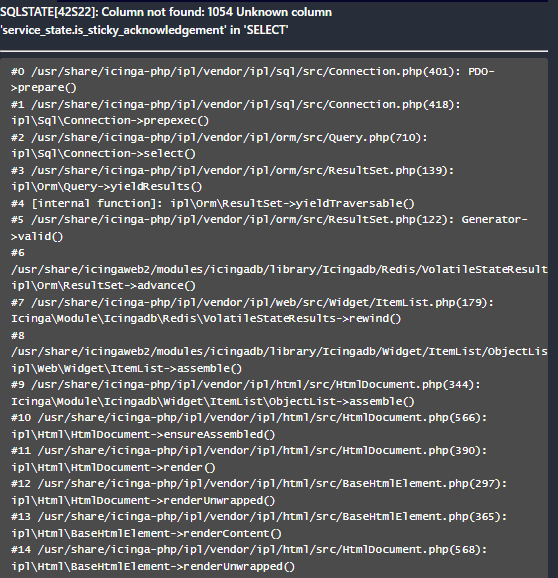
Your solution worked, and ICINGADB has restarted. However, I have another problem related to IPL. I have already updated IPL to the latest version. Any ideas?
you should recreate the icingadb database because some migration steps are not done correctly.
alternatively you can check each migration manually and check if the changes have been applied.
if there is an add column your column should exist in the database’s table
The Icinga DB Web error complains about the missing is_sticky_acknowledgement column in the service_state table. It was introduced in version 1.4.0.
As both @moreamazingnick and myself already wrote, starting from a blank new schema would be the easiest way to go unless you have an untempered database backup you can restore and apply the missing schema upgrades upon. Based on my earlier response, this backup should have been created before Thu Apr 17 07:04:31 PM UTC 2025.