Hi @adn77
I don’t know if this will help you, but I solved it with JEA as follows. It’s a bit of a messed-up solution 
I added a plugin to our custom-developed IfW plugins that can restart Windows services. This way, it can be deployed automatically with Update Icinga and the JEA profile is created correctly right away:
<#
.SYNOPSIS
    Starts a windows service, can be used as an event plugin
.DESCRIPTION
    Starts a windows service, can be used as an event plugin
.PARAMETER Services
    Comma-separated list of services to be started
.PARAMETER ServiceState
    Service state
.PARAMETER ServiceStateType
    Service state type
.PARAMETER ServiceAttempt
    Service attempts
.EXAMPLE
    Event Plugin
#>

function Invoke-IcingaCheckCustomStartService
{
    param(
        [string]$Services = "",
        [string]$ServiceState = "",
        [string]$ServiceStateType = "",
        [int]$ServiceAttempt = 0
    );

    $ServicesArray = ($Services -split ",").Trim()
    $status = ""

    if ($ServiceState -eq "CRITICAL") {
        foreach ($ServiceToRestart in $ServicesArray){
            try{
                $windowsService = Get-Service -Name $ServiceToRestart -ErrorAction SilentlyContinue

                if ($null -eq $windowsService) {
                    $status += "$($ServiceToRestart):not found "
                }
                elseif ($windowsService.Status -eq 'Running') {
                    Restart-Service -Name $ServiceToRestart -Force -ErrorAction Stop
                    $status += "$($ServiceToRestart):restarted "
                }
                else {
                    Start-Service -Name $ServiceToRestart -ErrorAction Stop
                    $status += "$($ServiceToRestart):started "
                }
            }
            catch{
                $status += "$($ServiceToRestart):not started "
            }
        }
    }

    else {
        $status = "not critical"
    }

    $IcingaCheck = New-IcingaCheck -Name 'StartService' -Value $status
    return (New-IcingaCheckResult -Check $IcingaCheck -Compile -NoPerfData $true);
}
Then I set up an event command:
object EventCommand "custom-event-start-windows-service" {
  command = [
    "C:\\Windows\\System32\\WindowsPowerShell\\v1.0\\powershell.exe",
    "-NoProfile",
    "-ExecutionPolicy", "Bypass",
    "Invoke-Command -ComputerName localhost -ConfigurationName IcingaForWindows -ScriptBlock {Invoke-IcingaCheckCustomStartService -Services '$start_service$' -ServiceState $service.state$}"
  ]

  vars.start_service = "$Custom_Event_Start_Windows_Service_Services$"
}
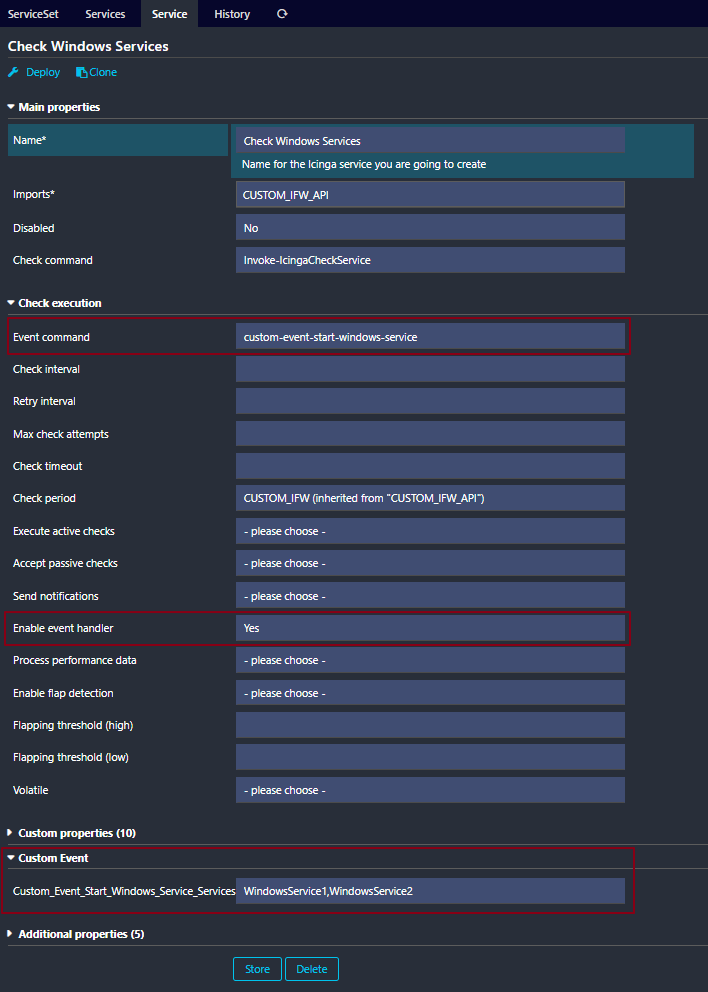
Now just add the variable for the Windows services to the service and it should work: