Gaps in Grafana graphs (Icinga2 + InfluxDB) despite checks running

Hi all

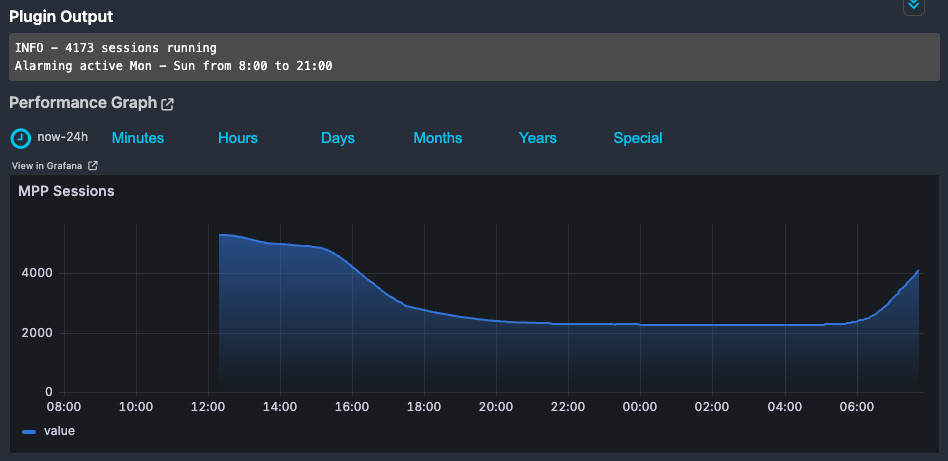
We started monitoring our infrastructure with Icinga2 and display performance metrics using Grafana and InfluxDB. It kind of works, but sometimes there are gaps in the graph:

This service is monitored 24/7 with an interval of 3 minutes. Yet if I look at the past 24 hours, the graph only appears at 12:18.

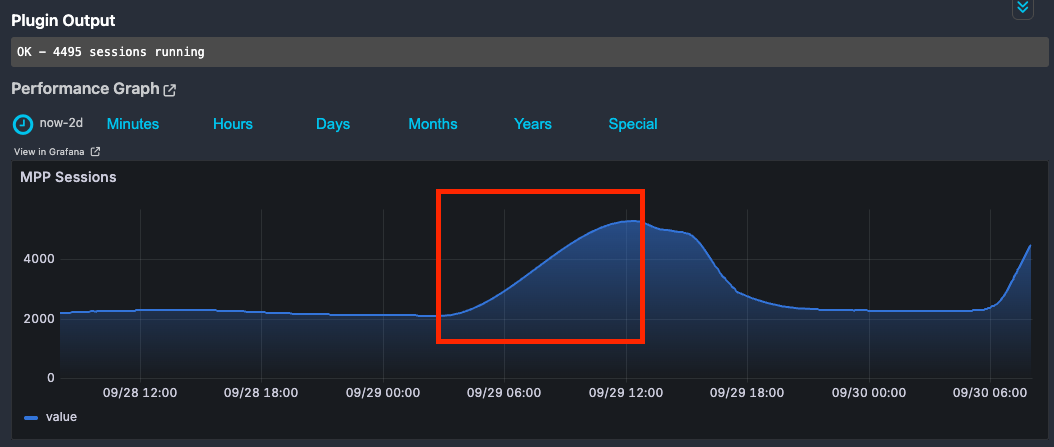
If I zoom out a bit, it looks better:

But if I hover over the graph, I see that there are no data points between 29.9. 2:50 up until 29.9. 12:18.

The service checks are executed every 3 minutes. Sometimes Grafana/InfluxDB is randomly missing performance data
But I can’t figure out why we don’t get the performance data to display…
Has anyone faced the same issue or knows how I can solve it?

Icinga Setup Infos:

  • Icinga Web 2 version
    • 2.12.5
  • Used modules and their versions (System - About)
    • grafana v3.0.1
    • icingadb v1.2.2
    • incubator v0.22.0
    • vspheredb v1.7.1
    • icinga/icinga-php-library v0.17.0
    • icinga/icinga-php-thirdparty v0.13.1
  • Web browser used
    • Google Chrome
  • Icinga 2 version used (icinga2 --version)
    • r2.15.0-1
  • PHP version used (php --version)
    • 8.3.6
  • Server operating system and version
    • Ubuntu 24.04.3 LTS
  • InfluxDB version
    • 2.7.12-1

Hi @lgubler,
Might it just be the case of the Monitoring Plugin not reporting performance data in that time frame? Was there a different state in that time frame? An Alarm for example?

Thanks @lorenz for the reply earlier. I was able to figure out why it wasn’t working. Icinga2 itself and the monitoring were fine. The issue was with my Influxdb2Writer configuration.

When I had enable_send_metadata = true, InfluxDB wasn’t able to properly process the results. In the logs I saw lots of these warnings:

[2025-09-30 21:57:17 +0200] warning/Influxdb2Writer: Unexpected response code: Bad Request
[2025-09-30 21:57:17 +0200] warning/Influxdb2Writer: Unexpected Content-Type: application/json; charset=utf-8 
[2025-09-30 21:57:17 +0200] warning/Influxdb2Writer: Unexpected response code: Bad Request
[2025-09-30 21:57:17 +0200] warning/Influxdb2Writer: Unexpected Content-Type: application/json; charset=utf-8 
[2025-09-30 21:57:17 +0200] warning/Influxdb2Writer: Unexpected response code: Bad Request 
[2025-09-30 21:57:17 +0200] warning/Influxdb2Writer: Unexpected Content-Type: application/json; charset=utf-8

It seems like InfluxDB wasn’t able to properly process the metadata.

I also set flush_threshold to 1 and flush_interval to 5s. Default values were 1024 and 10s. But with those values it didn’t work either.

Here’s the updated Influxdb2Writer object we have right now.

object Influxdb2Writer "influxdb2" {
  host = "localhost"
  port = 8086
  bucket = "icinga2"
  organization = "icinga"
  auth_token = "SECRET"
  enable_send_thresholds = true
  enable_send_metadata = false
  flush_threshold = 1
  flush_interval = 5s
  host_template = {
    measurement = "$host.check_command$"
    tags = {
      hostname = "$host.name$"
    }
  }
  service_template = {
    measurement = "$service.check_command$"
    tags = {
      hostname = "$host.name$"
      service = "$service.name$"
    }
  }
}

Please keep in mind that this is the first time I’m using Icinga2, InfluxDB and Grafana in production. If anyone knows about some improvements or explanations why InfluxDB failed when processing the metadata, please let me know!

Ok, the Influx error message gives us a hint. There are some edge cases where icinga2 tries to write “invalid” performance data (“invalid” in the sense that InfluxDB rejects them for some reason).

The leads to some weird effects, since icinga2 bundles a lot of data points (1024 (flush_threshold) by default or less depending on the flush_interval) and if the write request is rejected all of those are dropped.
You are currently circumventing this by writing every data point in it’s own request (which will be slower/more expensive).

In the log of icinga2 you should be able to find error message like

warning/Influxdb2Writer: Ignoring invalid perfdata for checkable 

which should point you to the failing data point. Ideally you could report that so icinga2 can be modified to filter them out ahead of time.