Hi,
I’m currently running Icinga Powershell Agent on multiple servers (Windows 2016, 2022).
All of them are running Bitdefender Gravity Zone.
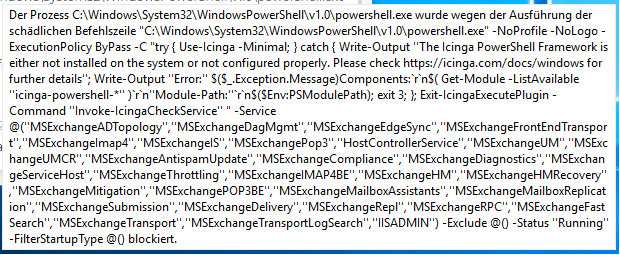
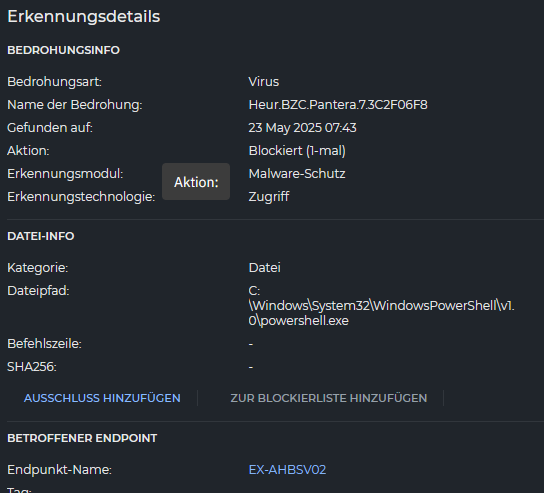
For some reason Bitdefender blocks the Check for Exchange Services on one of them (Other Servers run Service Checks, too, without a problem).
Now I’m trying to figure out which exception to set - as I don’t want to set an general exception for the powershell.exe for obvious reasons.
I have the same problem with Crowdstrike. I’ve had to add exceptions for every single aspect of Icinga, as CS just sees it as malware. Both for when service checks are running and also installing Icinga PowerShell Framework. It’s been a nightmare.
just wanted to give a quick update and close the loop on the issue I reported a while ago, where Bitdefender was flagging the Icinga Windows agent as malicious and blocking it.
Unfortunately, adding exclusions in Bitdefender didn’t really work as expected. So I got in touch with their support, sent them the logs and some samples, and they took a closer look.
Good news: they confirmed that the behavior of the Icinga agent is harmless and have now whitelisted it for future versions.
If you’re running Bitdefender and it still blocks Icinga you should update - mine did that automatically last night and since then all works as expected!